AI Video · Living Photos
LTX-2.5 Cinemagraph: Freeze the Photo, Let One Detail Come Alive
A cinemagraph is a photo that is almost perfectly still, except for one small thing that keeps moving: steam curling from a cup, a neon sign buzzing, clouds racing over a quiet street. It stops the scroll because the eye expects a picture and gets a tiny surprise. LTX-2.5 Cinemagraph is an official LoRA from Lightricks that creates exactly this effect from a single image. You upload a still, say which part should move, and it returns a smooth loop where everything else stays frozen. Below are the best ideas to try, where living photos pay off, prompt templates you can copy and the settings that make the loop clean.
- One element moves
- Seamless loop
- Image-to-video LoRA
Make Only Part of a Photo Move
Making a cinemagraph used to be a small production. You shot a video on a tripod, brought it into Photoshop or After Effects, painted a mask over the area that should move and looped it by hand. Apps such as Plotagraph and Motionleap made it easier, but you still drew arrows and anchor points one by one, and the result only worked if your photo already contained the motion.
LTX-2.5 Cinemagraph skips all of that. One photo and one sentence are enough: only the clouds move, only the steam rises, only the rain runs down the glass. Because the model imagines the motion, it can even animate things your camera never recorded, such as waves reflected in a pair of sunglasses or an illustrated tear rolling down a cheek. That makes it a quick AI cinemagraph generator for anyone who wants a moving photo loop without a video shoot.
- Faster: start from a single image instead of filming a clip first.
- Cheaper: no tripod footage, masking software or editing hours.
- New looks: motion that never existed in the original photo can still be added.
- Calm results: the rest of the frame stays still instead of wobbling.
Four Demo Loops That Show the Magic
The best way to understand the effect is to look at the examples Lightricks shows on the model card. Each one keeps a scene completely still and lets a single element carry the whole mood:
- Sunglasses reflection: a person stands motionless while ocean waves keep rolling inside the mirrored lenses.
- Time-lapse sky: a person and a cow stay frozen in a field while the clouds above sweep past like a time-lapse.
- Mixed media tear: a woman on a plane is completely still while a collage-style illustrated tear slides down her face.
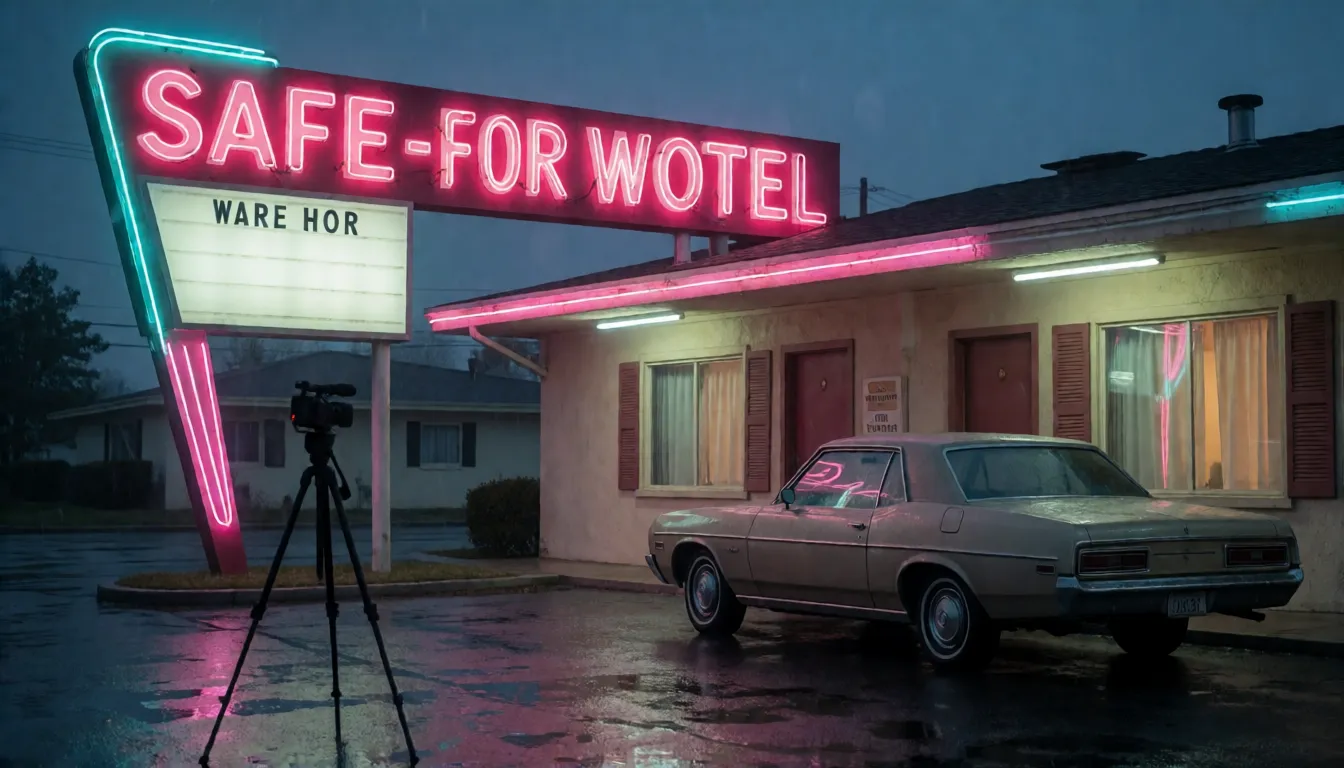
- Vintage neon: a roadside motel sits in silence while its neon sign flickers and pulses like the real thing.
Notice the pattern: one subject that is frozen, one element that moves and a camera that never shifts. Lightricks trained the adapter on locked-off tripod scenes without people moving, which is why it behaves so politely. It leaves your composition alone and only animates what you ask for.
Where Living Photos Grab Attention
Lightricks names animated wallpapers, social media content and artistic motion pieces as the intended uses. In practice, a loop made with LTX-2.5 Cinemagraph works anywhere a still image has to earn a second look without the weight of a full video:
- Social media: animated covers, Reels and Stories openers, profile banners and meme-style loops.
- E-commerce and ads: coffee steam, perfume glass catching the light, jewelry sparkle, bubbles rising in a drink. The product stays sharp while the motion pulls the eye in.
- Posters for short dramas and films: rain, candle flames or distant lightning moving behind a frozen hero (a creative use, not an official example).
- Travel and real estate: waterfalls, waves and drifting clouds over a still landscape or a villa terrace.
- Animated wallpaper from a photo: a slow, endless loop for desktop or phone lock screens, music covers and digital art.

Seven Cinemagraph Ideas to Try First
If you are not sure where to start, pick one of these setups. Each has a single, obvious moving element, which is exactly what LTX-2.5 Cinemagraph does best:
- Racing sky: people or buildings stay frozen and only the clouds fly past.
- Reflections: waves, city lights or fireworks moving inside sunglasses, windows or a puddle.
- Neon nights: a shop sign or bar light flickering on an otherwise silent street.
- Weather: rain streaks, falling snow or mist drifting through a forest.
- Water: a waterfall, a river or ripples spreading in a glass.
- Mixed media: a real photo with drawn tears, stars or hearts that move.
- Product micro-motion: steam, bubbles or a sweep of light across a bottle.
CINEMAGRAPH_MOTION Prompt Templates
With LTX-2.5 Cinemagraph, every prompt starts with the trigger word CINEMAGRAPH_MOTION. After that, the winning formula is simple: say what stays frozen, say the one thing that moves, and ask for a static camera and a seamless loop. Animate one element at a time; asking for three moving things at once usually breaks the illusion. These templates follow the structure of the official examples:
Add the official negative prompt to keep the frame calm: cars moving, camera movement, pan, tilt, zoom, parallax, whole image moving, background sliding, person moving, flicker on entire image, noisy texture, crawling texture, distorted, blurry, low quality.
Basic skeleton
CINEMAGRAPH_MOTION, tripod locked-off static camera, zero camera movement, [subject] remains completely frozen, only [element] moves, [motion], everything else stays perfectly still, seamless natural loop
Racing clouds
CINEMAGRAPH_MOTION, static camera, the person and buildings remain completely frozen, only the clouds drift in fast time-lapse across the sky, seamless natural loop
Coffee steam
CINEMAGRAPH_MOTION, static camera, the cup, table and hands remain frozen, only the steam rises and curls softly above the coffee, seamless natural loop
Neon sign
CINEMAGRAPH_MOTION, static camera, only the neon sign flickers and pulses like a real vintage sign, everything else stays perfectly still, seamless natural loop
Rainy window
CINEMAGRAPH_MOTION, static camera, the room and the woman remain frozen, only raindrops stream down the window glass, seamless natural loop
Fireworks behind
CINEMAGRAPH_MOTION, static camera, she stays completely still, only the fireworks bloom in the night sky behind her, seamless natural loop
LoRA Download and ComfyUI Workflow
The adapter lives on Hugging Face as Lightricks/LTX-2.5-22b-LoRA-Cinemagraph. The download is gated, so you accept the terms on the page first, and you also need the LTX-2.5 base model. It plugs into the image-to-video workflow from the official ComfyUI-LTXVideo nodes. The model card recommends these settings:
- Load the LoRA in the ComfyUI-LTXVideo image-to-video workflow.
- Set LoRA strength between 1.0 and 1.2 (it works from 0.5 to 1.5).
- Use 30 steps and guidance 4.0.
- Render at 512×704 with 25 frames, the resolution it was trained on.
- Start the prompt with CINEMAGRAPH_MOTION and add the negative prompt above.
Higher resolutions have not been described by Lightricks, so treat them as an experiment. Short loops are the sweet spot.
Best Results, and When to Use Regular Image-to-Video
LTX-2.5 Cinemagraph is a specialist. It shines with one moving element, a fixed camera and a loop. Lightricks lists camera moves, people's body movement, complex action scenes and several moving subjects as outside its scope. If you want someone to walk, dance or turn toward the camera, a regular image-to-video model is the better tool.
Pick photos with a clear separation between the frozen part and the moving part: sky above a skyline, steam against a dark background, rain on a window. Busy images where everything could move tend to produce flicker, and that is exactly what the negative prompt tries to prevent.
LTX-2.3 vs LTX-2.5, and Other Cinemagraph LoRAs
Lightricks also published a Cinemagraph LoRA for LTX-2.3. The 2.5 release is built for the newer LTX-2.5 base model, but Lightricks has not listed specific quality gains, and some sample files on the new card still carry LTX_2.3 names. So the honest answer is: use the version that matches your base model.
The idea is popular well beyond Lightricks. The community has a cinemagraph LoRA for the Wan 2.2 5B model too, and downloads of the LTX-2.5 adapter climbed from 1,681 in its first month to 7,044 by November 20, 2026. Independent reviews are still scarce, so judge it by the official demos and your own tests.
Uncensored and 18+ Cinemagraph Ideas
The weights are open and run locally without an online filter, but there is no official or known community uncensored edition, and the training data is landscapes and objects rather than people. For adult loops, the same frozen-subject-plus-one-moving-element prompt works on open video models that allow 18+ content. Keep every model a fictional adult or a consenting person, and try ideas like these:
- Bikini on the beach: the model is frozen in a pose while waves and sunlight sparkle behind her.
- Boudoir by candlelight: lingerie portrait stays still while curtains sway and candle flames flicker.
- Poolside: she lounges motionless while the water ripples and reflections dance across the tiles.
- Neon bar: a glamour shot frozen in place while the neon sign behind her pulses.

Uncensored Alternative Video Generator
No GPU or ComfyUI? Upload your photo on Spicy AI's image-to-video page, describe the one thing that should move, ask for a locked camera and a seamless loop, then export the clip as a cover, story opener or wallpaper. Adult (18+) loops are allowed, and every character must be a fictional adult or someone who has given consent.
- Upload a sharp photo with a clear subject and one obvious moving element.
- Write the prompt as: what stays frozen, what moves, and how it moves.
- Add “static camera, seamless loop” and keep the clip short.
- Generate a few takes and keep the one with the cleanest loop point.
Self-Hosting the LoRA vs Generating on Spicy AI
| Local deployment (official weights) | Spicy AI online | |
|---|---|---|
| Content filtering | No online filter when run locally | Adult (18+) content allowed |
| Open weights | Yes, gated download on Hugging Face | Not needed, runs in the browser |
| Model actually used | LTX-2.5 with the cinemagraph LoRA | Spicy AI's own video models |
| Price | Free weights, but you need a capable GPU | Free to start, credits for more |
- Local: the dedicated trigger word and precise loop settings inside ComfyUI.
- Spicy AI: upload a photo and animate it without installing anything.
Frequently Asked Questions
What is LTX-2.5 Cinemagraph?
It is an official Lightricks LoRA for the LTX-2.5 image-to-video model. It turns a still photo into a looping clip where only one chosen element moves and the rest of the frame stays frozen.
What is the trigger word?
Start your prompt with CINEMAGRAPH_MOTION. Recommended settings are LoRA strength 1.0–1.2, 30 steps, guidance 4.0 and 512×704 with 25 frames.
Can it make people move?
Not really. Body movement, camera moves and several moving subjects are outside its scope. Use regular image-to-video when a person needs to act.
Is it free to download?
Yes, the weights are free on Hugging Face after you accept the terms on the model page. You also need the LTX-2.5 base model and a capable GPU.
Is it better than the LTX-2.3 version?
It is made for the newer LTX-2.5 base. Lightricks has not published specific improvements, so pick the version that matches the base model you use.
Can I make a cinemagraph without ComfyUI?
Yes. Any image-to-video generator can get close if you describe what stays frozen, what moves, a static camera and a seamless loop.
Sources
More AI Video Models
- Uncensored LTX Video
- Uncensored LTX-2.5 Slow Motion
- Uncensored Kling
- Uncensored Kling 2.6
- Uncensored Kling O1
- Uncensored Sora
- Uncensored Veo
- Uncensored Hailuo AI
- Uncensored MiniMax H3 Max
- Uncensored Wan
- Uncensored Wan 3.0
- Uncensored Seedance
- Uncensored Seedance 2.5
- Uncensored Seedance 2.0
- Uncensored Seedance 2.0 Mini
- Uncensored HunyuanVideo
- Uncensored Runway
- Uncensored Pika
- Uncensored Luma Dream Machine
- Uncensored Vidu
- Uncensored PixVerse
- Uncensored EdenLive
- Uncensored UniAVC
- Uncensored Grok Imagine
- Uncensored AI Avatars
- Uncensored HappyHorse 1.0
- Uncensored MiniMax H3 FL2VA Ref2VA
- Uncensored Kling 4.0
- Uncensored Kling 3.0
- Uncensored MiniMax H3 RefMods
- Uncensored Kandinsky 6.0
- Uncensored Looking Ahead
- Uncensored Kandinsky S2V 1.0 Pro
- Uncensored TaoMate-H3
- Uncensored SANA-Video 2.0
- Uncensored MiniMax H3 Remix
- Uncensored Sora 2
- Uncensored Wan 2.6
- Uncensored VDN MiniMax H3
- Uncensored Hy-Nomas
- Uncensored Seedance 1.5 Pro
- Uncensored Pika H3 Flex
- Uncensored Veo 3.1
- Uncensored LongCat-Video-Avatar 1.6
- Uncensored MiniMax H3 x Z-Image
- Uncensored Origami-H3
- Uncensored Wan 2.6 Flash
LTX and Lightricks are trademarks of their respective owners. All content must depict adults (18+).