Open AI world model · Tencent Hunyuan
Uncensored Hy-Nomas: Walk Into an AI World and Rewrite It as You Go
Most AI video tools hand you one fixed clip and stop. Hy-Nomas keeps going. Released for free by Tencent Hunyuan in late October 2026, it builds a scene a few seconds at a time, remembers everything it has already shown, and lets you change the story or swing the camera before every new stretch. Type “glowing blue flowers start growing along the path” and they bloom further down the road you are already walking.
- Free to download
- Steer with text + camera
- Walk around with WASD
- Sharp 720p video
- Runs on one RTX 4090

Uncensored Alternative Video Generator
Image to videoNo install, no graphics card. Add a starting photo, describe the walk, drive or camera move you have in mind, and your clip starts rendering in the image-to-video studio. Adult themes are fine as long as everyone shown is 18+.
Direct a World, Not Just a Clip
A regular AI video tool works like a vending machine: one prompt goes in, one short clip comes out, and if you want something different you start over. Hy-Nomas feels more like a film set that never closes. It films about five seconds at a time, and before the next five you can drop in a new object, change the weather, switch the art style, give your character something new to do or point the camera somewhere else. Nothing you already made is thrown away.
What makes it feel real is memory. The street you turned away from is still the same street when you look back, and the fox you met at the start is still the same fox a minute later. Tencent's own showcase strings five rounds into a one-minute single take of a bird gliding over rooftops and into a clock tower, the kind of shot that normally needs a real drone and a lot of luck.
| Regular AI video | Hy-Nomas | |
|---|---|---|
| What you get | One fixed short clip | A world that keeps growing, a few seconds at a time |
| Changing your mind | Start again from zero | A new instruction only changes what comes next |
| Camera | Described once, then locked | Typed directions, a planned route or live WASD keys |
| Staying consistent | Only inside one clip | Places and characters are remembered across rounds |
From HY-World 1.5 to Free-Form Worlds
Tencent already had a hit with HY-World 1.5, which let people wander around a generated scene with camera and movement controls. Creators loved the feeling of stepping inside a video, but the story was mostly set once the scene began. Hy-Nomas keeps the wandering and adds the missing half: you can talk to the world in the middle of the ride. Grow flowers, start the rain or turn a city into a watercolor painting without ever leaving the shot.
- New: typing and steering can take turns in the same video, so you no longer pick one or the other.
- New: a faster edition turns out each round quickly, in sharp 720p with smooth, film-like motion.
- New: a slimmed-down mode fits on a single RTX 4090 gaming card instead of a rack of servers.
- Good to know: it is at its best with places, journeys and camera moves. Close-up faces and fine body detail look better in tools made for character video.
Scenes People Are Building Right Now
The first wave of Hy-Nomas community clips falls into a few clear favorites. Game designers use it to show off the mood of a level, short-drama creators sketch moving storyboards, and travel-style creators make dreamy walkthroughs that change season halfway down the road. Because every round can be rewritten, one session often ends with several versions of the same place, which is far quicker than making unrelated clips and hoping they cut together.
First-person drives
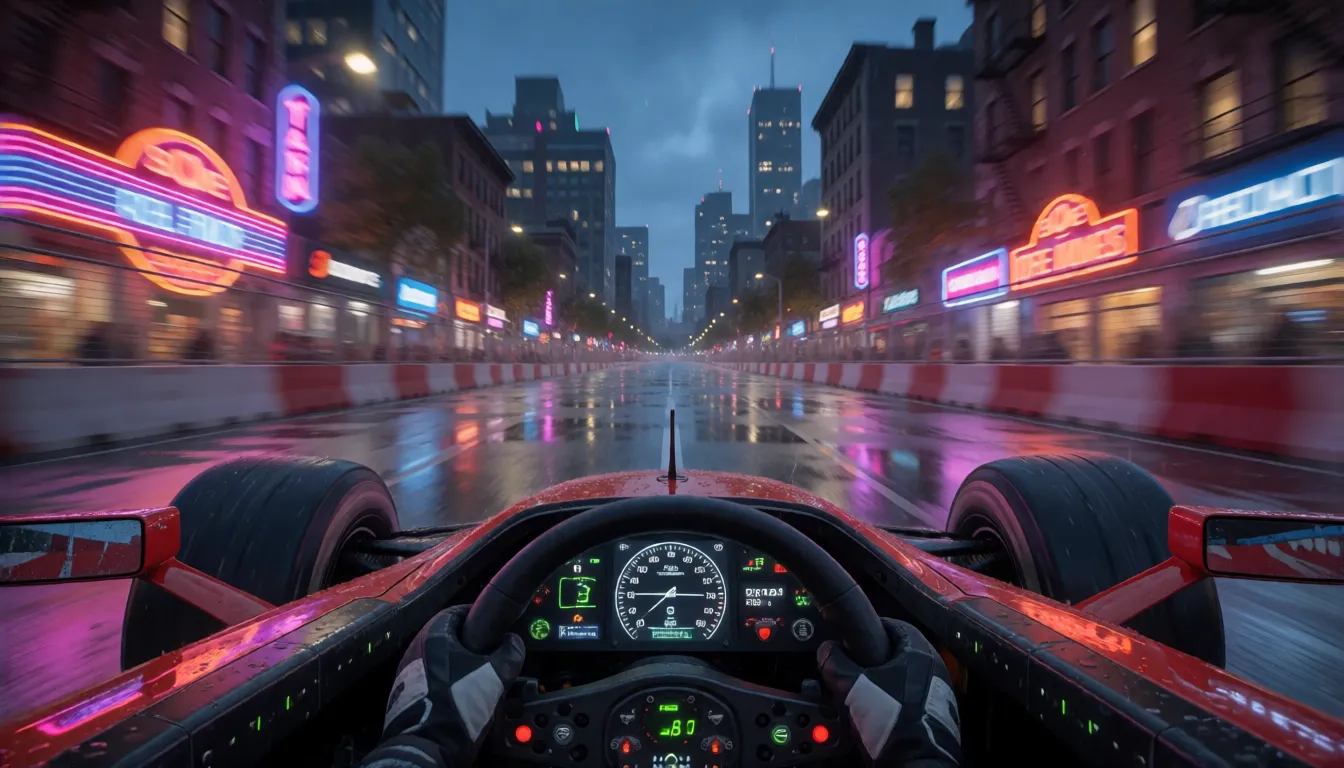
The showcase circuit-drive clip looks out of a race car cockpit along a street track. Swap the city, the hour or the weather between rounds and the lap simply keeps going.
One-take flyovers
Long routes like the clockwork-flight bird show off the memory: rooftops, chimneys and the tower stay exactly where they were for a full minute.
Storyboards for short dramas
Keep one alley and the same characters, then rewrite the action round by round to preview a scene before a real shoot.
Game level mood tests
Walk one corridor and flip it from cyberpunk neon to snowfall to golden dusk to show how a level could feel.
Step into your own photo
Community tools can start from a picture you upload, so a holiday snapshot becomes a place you can walk into and explore.
Robot demos
An add-on trained on two-armed robot footage produces clips of robot hands at work, handy for robotics demos and experiments.
Three Ways to Try It Today
You can explore Hy-Nomas in a browser, inside ComfyUI or by downloading it yourself. The browser demo is the easiest taste, ComfyUI is the favorite of people who create on their own PC, and the full download is there for tinkerers who want every option.
- Online demo: open hy-nomas.hy.tencent.com/demo and sign up. Walk around with WASD or the arrow keys and type new ideas while the world unfolds; a built-in helper polishes your wording for you.
- ComfyUI workflow: free community packs come with ready-made workflows for round-by-round stories, photo-to-world, camera control and a drive mode. Load one, type your scene and press run, with no coding involved.
- Download: everything is free on Hugging Face (tencent/Hy-Nomas) and GitHub, including the standard and fast versions, a lighter build for home PCs, and add-ons for a more cinematic look and for robot scenes.
Can Your PC Run It? One RTX 4090 Is Enough
Tencent's own setup spreads the work across eight graphics cards, but there is a lighter recipe made for a single RTX 4090. It uses compressed versions of the model and parks part of the load in ordinary system memory, so plenty of RAM matters as much as the card itself. Tencent has not published speed figures, so the numbers below come from early community testers. Treat them as individual results, not promises.
| Question | What we know | Who says so |
|---|---|---|
| How big is the download? | About 27 GB for the lighter ComfyUI setup | Community pack author |
| How much video memory? | 12 GB or more recommended | Community pack author |
| How fast on an RTX 4090? | A 20-second clip in about 3 minutes; drive mode about 4.3 s per round | Community pack author |
| How fast on an RTX 5090? | About 21 s for one 3-second round | User report via ComfyUI Wiki |
| Picture quality | 720p by default, 480p as a faster option, 24 frames per second | Tencent's model card |
Prompt Templates That Keep the World Steady
A good prompt here reads like a tiny film script with four parts: the look, the point of view, the cast, and a list of rounds. The first round paints the full scene. Every later round only says what changes and what happens next. In the online demo you can simply type sentences like the ones below. The downloadable version wants the same script in a stricter fill-in-the-blanks format; paste a template into any chatbot and ask it to convert it for you.
- Change only one or two things per round; big jumps make the world wobble.
- Describe each character once in the cast and keep calling them by the same name, so faces and outfits stay the same.
- Say where the camera goes in every round, or leave it out and steer with the WASD keys instead.
- Switch on the cinematic add-on when a polished look matters more than speed.
Template 1 · Rainy neon walk (first person)
Look: cinematic, realistic
View: first person
Round 1 (0–5 s): A rainy neon street at night, wet asphalt mirroring the shop signs. The camera walks slowly forward.
Round 2 (5–10 s), change: The rain stops and a glowing ramen stall appears on the corner. The camera turns right and approaches the stall.
Template 2 · Resort beach stroll (third person, adults)
Look: warm cinematic travel film
View: third person
Cast: Mia, an adult woman in a red bikini and sun hat, long dark hair
Round 1 (0–5 s): Mia strolls along a palm-lined resort beach at golden hour. The camera follows at shoulder height.
Round 2 (5–10 s), change: Lanterns light up along a beach bar ahead. Mia turns toward the bar as the camera glides past her.
Template 3 · One road, three art styles
Look: photorealistic
View: first person
Round 1 (0–5 s): A quiet mountain road lined with pine trees in morning light. The camera drives forward at a steady pace.
Round 2 (5–10 s), change: The whole scene turns into a soft watercolor painting. The camera keeps driving.
Round 3 (10–15 s), change: The scene becomes colorful pixel art and snow starts to fall. The camera slows down.
Hy-Nomas vs Genie 3 and Other World Models
Worlds you can walk through are the hottest corner of AI video right now, and the obvious comparison is Genie 3 from Google DeepMind. Both let you move through a generated place as it appears. The big difference is access: Genie 3 lives inside Google's own previews, while Tencent's model is a free download that anyone can run, study and build on at home. That makes it one of the most capable open-source interactive world models you can actually get your hands on.
| Model | What it is best at | Free download |
|---|---|---|
| Hy-Nomas | Long takes you keep rewriting with text and camera moves | Yes |
| Genie 3 (Google DeepMind) | Explorable worlds from a single prompt | No |
| HY-World 1.5 (Tencent) | Wandering a scene with camera and movement keys | Yes |
| EdenLive | Real-time rendering | — |
| LTX-2.5 | Video with matching sound | Yes |
Uncensored Hy-Nomas: What Local Runs Allow
Run it on your own computer and there is no online filter standing between you and your idea, while the hosted demo needs an account and follows platform rules. So far nobody in the community has released an adult-tuned edition. The only add-ons are Tencent's cinematic and robot ones, and training a new one takes far more hardware than a hobbyist owns, so do not expect a spicy community remix overnight.
Where Hy-Nomas already shines for adult creators is atmosphere: a first-person stroll through a beach resort with an adult couple, a bikini walk across golden-hour sand, or a neon nightclub you drift through like a guest. It builds places better than close-up bodies, so for character-led 18+ clips an image-to-video tool is the quicker route.

Turn your own adult beach, pool or nightlife photo into a moving clip, no gaming PC needed.
Start image to videoSelf-Hosting the Model vs Generating Online at Spicy AI
Running it yourself gives you the real walk-through world and full control, at the price of a big download, a powerful graphics card and plenty of memory. Generating online skips all of that but uses different video models, so it is about quick adult clips from a photo and not about worlds you steer.
| Local deployment (official weights) | Spicy AI online | |
|---|---|---|
| Content filter | None on your own machine | Adult (18+) content allowed |
| Open weights | Yes, free to download | Not needed, runs in the browser |
| Model actually used | The open model itself | Spicy AI's own video models |
| Cost | Your hardware and electricity | Credits on the site |
| Best for | Long walks you steer and worlds you rewrite | Fast character-focused clips from a photo |
Where It Still Falls Short
Hy-Nomas is a first release, and it helps to know the rough edges before you plan a project around it. The longer a video runs, the more the model has to remember, so memory use on a single card keeps climbing with length. The fastest mode only works with its matching set of files, so mixing downloads can cost you speed. Faces and small details are usually softer than in tools built for character video, which is normal for world models. And Tencent has not yet published its full technical paper, so some numbers passed around online are still unconfirmed.
Questions People Ask
What is Hy-Nomas?
It is an interactive AI world model from Tencent Hunyuan. It makes video a few seconds at a time, and before each new stretch you can change the scene with a sentence or a camera move while it remembers what came before.
Where can I download it?
The files are free on Hugging Face under tencent/Hy-Nomas, and the code sits in the Tencent-Hunyuan GitHub repository. Community ComfyUI packs bundle what a home PC needs.
Can it run on one RTX 4090?
Yes. Tencent provides a lighter setup for a single RTX 4090 that also leans on plenty of system RAM, and a community ComfyUI pack recommends 12 GB or more of video memory.
How long can a video be?
Each round is about five seconds and you can keep adding more. Tencent's showcase reaches 60 seconds in five rounds, and no upper limit has been announced.
How do I control the camera?
In the web demo you walk around with WASD or the arrow keys. On your own PC you can describe camera moves in the prompt or load a pre-planned camera route.
Is there an uncensored or NSFW Hy-Nomas version?
Not yet. Running it locally means no online filter, but no adult-tuned community edition exists so far. For adult character clips, open video models such as HunyuanVideo or Wan have a far bigger adult community today.
How is it different from Genie 3?
Both create worlds you can move through. Tencent's model is a free download you can run at home and rewrite with text round after round, while Genie 3 has not been released for download.
Sources and Further Reading
Everything stated here comes from Tencent's model card and code repository plus early community reports.